With AppThemes Coupons, you can create coupons to offer special discounts to your customers. This can be a great incentive for new customers to try out your AppThemes site at a reduced rate, or to encourage existing customers to post more ads. You can set these coupons up with either a fixed price amount or percentage discount.
To install, simply upload the plugin via the WordPress Administrator Panel. Or extract the plugin’s files and manually upload via FTP. Once activated, you can add/update/delete Coupons via the Payments Menu, under the Coupons page.
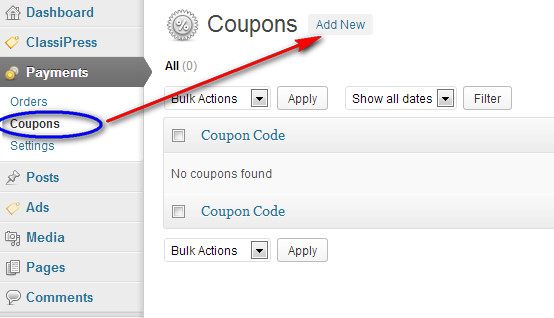
- Go to your WordPress Admin => Payments => Coupons, and select the “Add New” button located next to the “Coupons” header.
- Complete the Coupon information fields. See example screenshot on what can be entered.
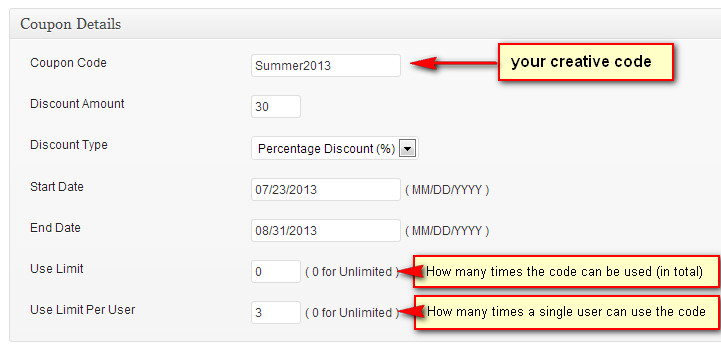
- Click the “Publish” button to create the coupon. Repeat the process as required, depending on how many different coupons you wish to offer.
- You can distribute these to your customers as you wish. All they need to know is the code, in this example Summer2013
How to use a Coupon
- Set up your Payment Gateways and any other Payments related setting tabs (Plans, Pricing, etc).
- During checkout, there will be a “Coupon” field, where the customer can enter in the code which you have created.
- After submitting the coupon, they should be able to see the discount generated as a result of using the coupon in the Order Summary page.